High Level Design
1. Trie
For autocomplete, the first thing that comes to mind is a Trie (prefix tree).
- Store all words in a Trie
- When user types a prefix → traverse the Trie
- Collect all matching words
- Sort them based on frequency (or relevance)
Note: One Modification: Each trie node also store Top-K suggestions (say top-5) based on frequency, refer the following diagram.
2. When to Build Trie
Now, building/updating Trie on each user-request is very expensive and not practical
- There are 2 billion read-request per day, updating trie on every query will signifcantly slows down the query service.
- Top suggestions may not change much once trie is built.
Solution: Use Analytics Logs to build Trie weekly.
- Take the Analytics Logs.
- Convert them to frequency-map (Keyword : frequency) also known as
Aggregated-Data. - The workers will build the Trie based on
Aggregated-Data.
3. Auto-Complete Service
- Self-Explantory (Search using the Trie), refer the diagram below
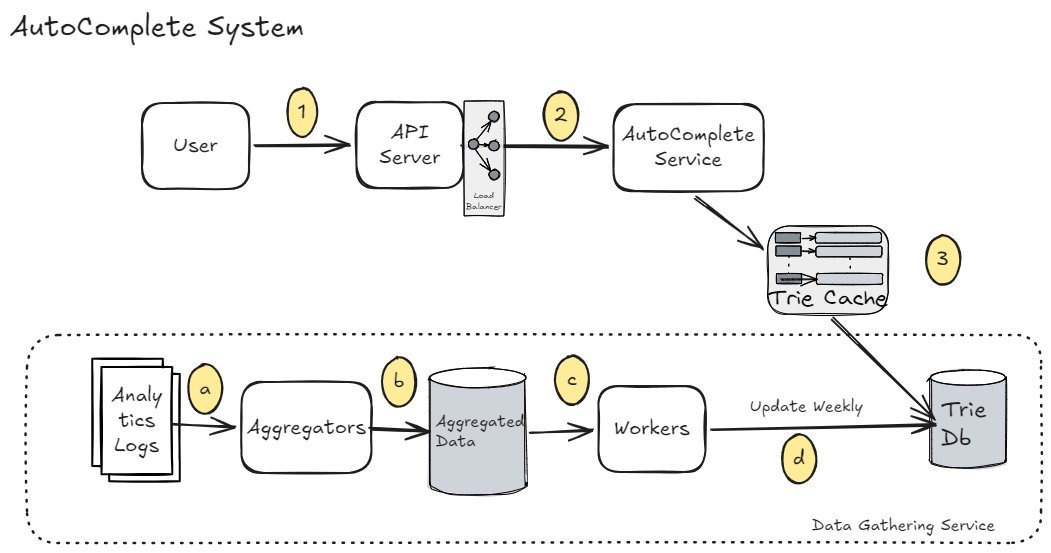
4. Trie Storage
4.1: Document Store (MongoDb)
Serialize the Trie and store in the Document Stores like MongoDb.
4.2: Key-Value Store
Stores the Trie in an hash-table: with key as prefix and value as trie's node data. Refer the following diagram:
5. Scale the Storage
When the dataset becomes huge (millions/billions of words), a single Trie won’t fit in one machine. So we need to distribute (shard) the data.
5.1: Basic Sharding (By Prefix)
Split data based on first character (prefix)
Shard-1 → words starting with ‘a’
Shard-2 → words starting with ‘b’
5.2: Smarter Sharding (Load-based)
-
Not all characters are equal
- Some prefixes have huge traffic (
s,a) - Some have very few words (
x,z)
- Some prefixes have huge traffic (
-
Better approach:
- High-volume prefixes → dedicated shards
- Low-volume prefixes → grouped together
Shard-1 → ‘a’
Shard-2 → ‘s’
Shard-3 → ‘b’, ‘c’, ‘d’
Shard-4 → ‘u’ to ‘z’
5.3: Language Based Sharding
- Separate shards per language
For excalidraw file, click here to download