High Level Design
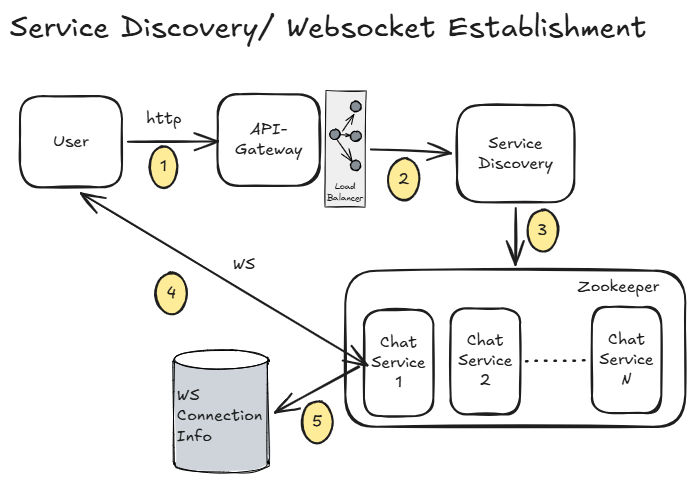
1. Service Discovery (WebSocket Connection Setup)
- When the user opens the app, the client sends a WebSocket connection request to the API Gateway.
- The API Gateway forwards this request to the
Service Discoveryservice. Service Discoverypicks an appropriateChat Serviceinstance based on:- Current load
- Geographic proximity (for lower latency)
- Other routing factors (like availability, health, etc.)
- The client is then connected to the selected
Chat Servicevia WebSocket. - Connection metadata (like user → server mapping) is stored in a
ws-connection-infodatastore.
Note:
- This
ws-connection-infowill be read very frequently (for routing messages). - Strong persistence is usually not critical (connections are short-lived and can be rebuilt).
So, using Redis (in-memory store) is a good choice here
2. One-on-One Chat Messaging
-
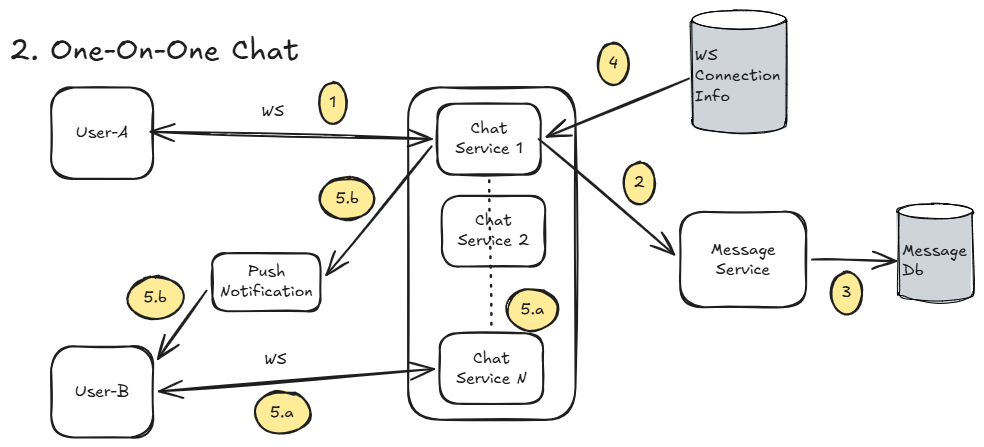
User-Asends a message over an active WebSocket connection to a chat server (sayChat-Service-1). -
The message is forwarded to a
Message Service. -
Message Servicestores the message inMessagesDB. -
Chat-Service-1looks upws-connection-infoto find whereUser-Bis connected (sayChat-Service-N). -
Now, two cases:
-
User-B is online:
Chat-Service-1 → Chat-Service-N → User-B -
User-B is offline:
- A push notification is triggered
- Message stays stored in DB until User-B comes online
-
2.1 When User-B Comes Online
User-Bconnects to a chat service (sayChat-Service-N).- Client requests unread messages via Chat Service → Message Service.
Message Servicefetches unread messages from DB and returns them.- Messages are delivered to
User-B.
Simple idea: DB acts as the source of truth for missed messages
2.2 Message Status Flow (Sent → Delivered → Read)
-
Sent
- Message is successfully stored in DB
- Status =
Sent - Ack sent back to
User-A
-
Delivered
- Message reaches
User-B's device User-Bsends acknowledgment- Status =
Delivered - Update sent to
User-A
- Message reaches
-
Read
User-Bopens the message- Client sends "read" acknowledgment
- Status =
Read - Update sent to
User-A
These are just state transitions backed by acknowledgments
2.3 Handling Media Messages (Images, Videos, Docs)
- Media is NOT sent directly via chat servers.
Instead:
- Client uploads media to object storage (like S3) using pre-signed URLs
- Only the media URL + metadata is sent as part of the message
- Message delivery works exactly like normal text messages.
- When
User-Breceives the message:- Client downloads media directly from object storage
- Displays it to the user
3. Last-Seen / Presence Info
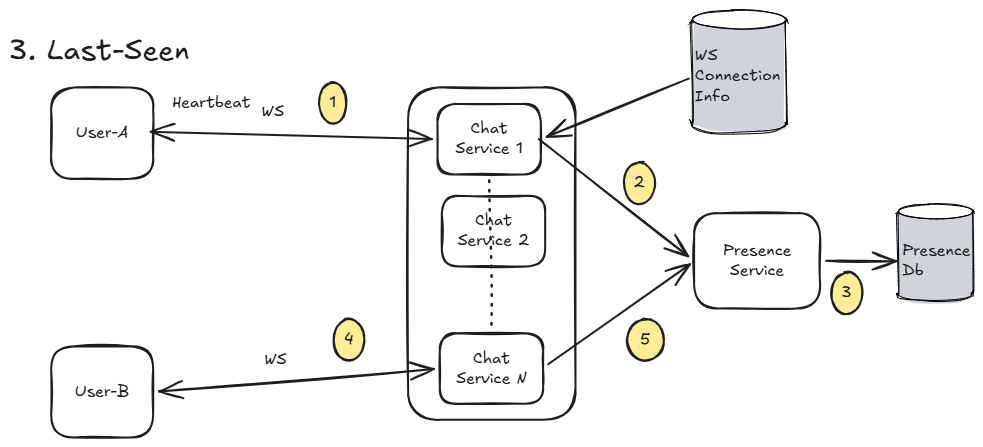
User-Aperiodically sends a heartbeat (say every ~30–60 seconds) over the existing WebSocket connection.- The request hits the
Chat Service, which forwards it to thePresence Service. Presence Serviceupdates the latest timestamp forUser-AinPresenceDB.
Simple idea:
“If we’ve heard from you recently → you’re online”
3.1 How Last-Seen is Calculated
threshold = 60
if time.Now() - last_seen_timestamp < threshold:
    return online()
else:
    return last_seen_timestamp
3.2 Fetching Presence Info
Option 1: Simple Request Model (Pull-based)
- User asks:
"What is User-A’s last seen?" - Flow:
Client → Chat Service → Presence Service → DB - Presence Service:
- Checks last timestamp
- Decides Online / Offline
- Returns last-seen
Pros:
- Simple
- Easy to implement
Cons:
- Not real-time
- Frequent polling can add load
Option 2: Subscriber Model (Push-based)
- User subscribes to presence updates of
User-A - Whenever
User-A’s status changes: Presence Servicegenerates an event- Event is pushed to all subscribers via Chat Service
Pros:
- Real-time updates
- Better user experience
Cons:
- More complex (needs pub-sub / event system)
- Needs efficient fan-out handling at scale
3. Group-Messaging
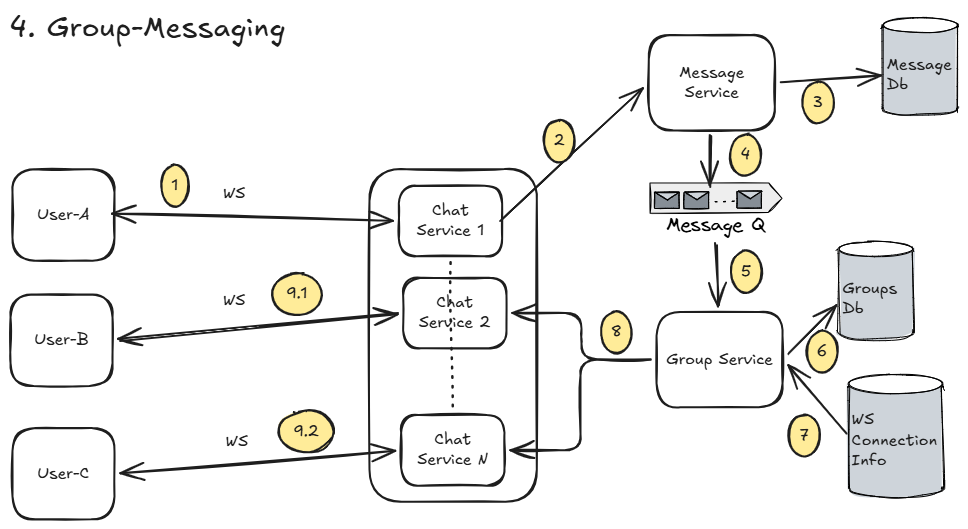
Flow is mostly similar to one-on-one messaging, just with a fan-out to multiple users.
User-Asends a message to groupG1via WebSocket toChat-Service-1.Chat-Service-1forwards the message toMessage Service.Message Servicestores the message inMessagesDB.- It then publishes a message event to a message queue.
Group Serviceconsumes this event.Group Servicefetches all members ofG1fromGroupsDB.- For each member (except
User-A):- Lookup
ws-connection-infoto find their connected chat server
- Lookup
- The group-Service then forwards the message to all such user via their respective chat-service
3.1 What’s Really Happening (Fan-out Pattern)
This is a classic fan-out problem:
- 1 message → N users
- Needs to be:
- Fast
- Scalable
- Fault-tolerant
Two Common Fan-out Strategies
1. Fan-out on Write (Push Model)
- Message is immediately pushed to all group members
Pros:
- Real-time delivery
- Simple read path
Cons:
- Expensive for large groups (N writes / deliveries)
- Can overload system for very large groups
2. Fan-out on Read (Pull Model)
- Store message once
- Deliver only when users fetch messages
Pros:
- Efficient for large groups
- Less immediate load
Cons:
- Higher latency
- More complex read logic
In reality, systems like WhatsApp use a hybrid approach:
- Small groups → Fan-out on write
- Large groups → Optimized / partial fan-out
For excalidraw file, click here to download