Whatsapp Theory
1. Core Communication Constraint
Traditional HTTPS follows a client-initiated request–response model:
- Communication is always: Client → Server
- The server cannot independently push data to the client without an active request
Implication:
While HTTPS works well for sending messages, it is not sufficient for real-time message delivery (receiving messages).
2. Server → Client Communication Strategies
To enable near real-time delivery, systems like WhatsApp rely on alternative patterns:
2.1 Polling
- Client periodically sends requests:
- Server responds with available updates (if any)
Pros:
- Simple to implement
- Works over standard HTTPS
Cons:
- High number of unnecessary requests
- Wastes CPU, network, and battery when no new messages exist
- Poor scalability at large scale
2.2 Long Polling
- Client sends a request and keeps the connection open
- Server responds only when:
- A new message arrives, OR
- A timeout occurs
Pros:
- Reduces unnecessary requests compared to polling
- Better latency than polling
Cons:
- Still inefficient under low message frequency (frequent timeouts)
- High connection management overhead on servers
- Not ideal for millions of concurrent users
2.3 WebSockets (Preferred Approach)
WebSockets provide a full-duplex (bidirectional) persistent connection.
How it works:
- Connection starts as an HTTPS request
- Client sends an Upgrade request:
Upgrade: websocket
Connection: Upgrade
- Server responds with:
HTTP/1.1 101 Switching Protocols
- Connection is upgraded to a persistent WebSocket channel
Benefits:
- True bidirectional communication (Client ↔ Server)
- Low latency message delivery
- Efficient for real-time systems
- Reduced overhead after connection establishment
Trade-offs:
- Requires stateful connection handling
- More complex infrastructure (connection management, scaling)
- Needs heartbeat/ping mechanisms to keep connections alive
2.4 WebSockets + Push Notification
In the previous section, websocket connection is established when user opens the App. If the client is inactive, then one better approach to send messages is to use push-notifications i.e.:
- Message reaches server
- If user is offline → trigger push notification
- App wakes up → re-establishes WebSocket → fetches messages
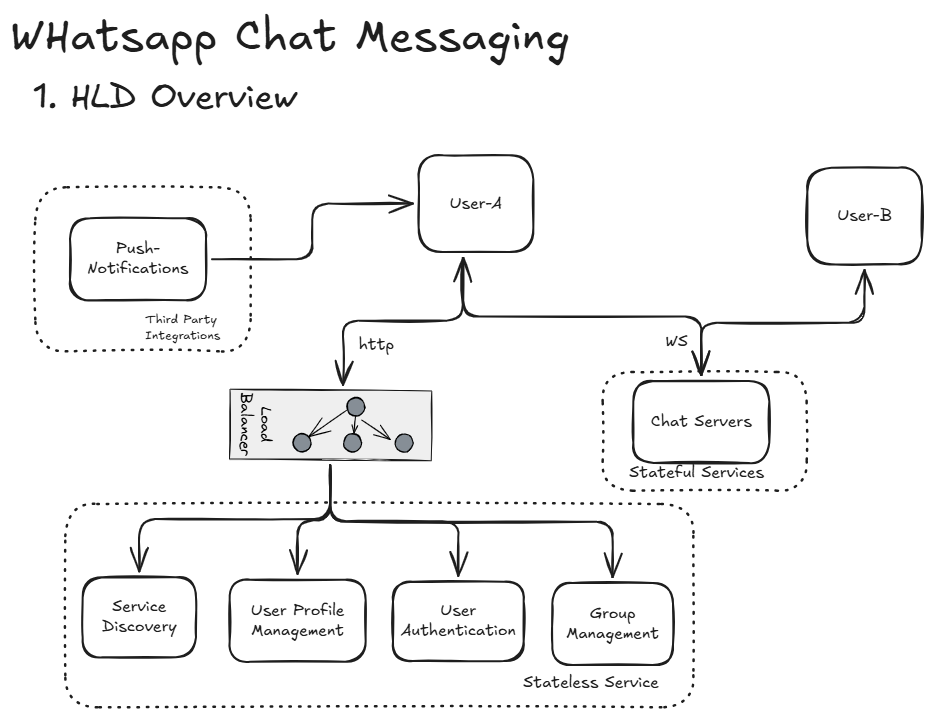
Therefore our overall Design looks like the following: